iPhone Duo Launch Day: What a Foldable Screen and On-Device AI Mean for Battery, Data and Your Wallet
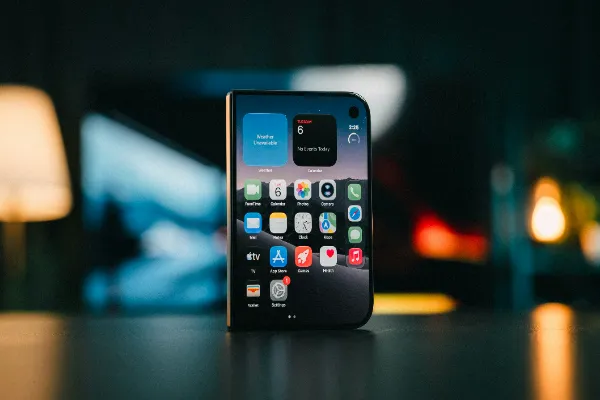
Tomorrow, 23 October, the iPhone Duo lands in stores. Apple’s first foldable has a 7.6-inch inner display, an A20 Pro chip and a price tag that starts at $1,999. Most of the coverage will argue about the hinge. Fair enough, hinges break. But the questions that matter after the unboxing glow fades are duller and more expensive: how fast does it drain, how much data does it chew through, and what does it really cost to own for three years?
This is the practical version. No spec-sheet worship.
The $1,999 question
Start with the number, because it decides everything else. A phone at this price is not a purchase, it is a payment plan. Spread over 36 months, you are looking at roughly $55 a month before tax, insurance and accessories. Mainstream reviewers have already weighed that price against what the Duo delivers, and the verdict is mixed: the engineering is first-class, the value case is not obvious.
Here is the part nobody puts on the box. Foldables carry higher repair costs, because the inner screen is the most fragile and expensive component. Budget for a case, a screen protector designed for folding panels, and some form of coverage. Add those and the true first-year cost drifts toward $2,300. Same logic as a mortgage, honestly: the headline rate is never the whole bill. If you are already stretching a household budget, the cheaper, boring phone is a legitimate answer.
Lifeak readers who followed our coverage of on-device generative AI will recognise the pattern. The chip does more work locally, which sounds free. It is not free. It costs power.
Battery: two cells, one big screen
Apple solved the foldable power problem the obvious way, with a dual-battery design, one cell in each half. The A20 Pro’s Neural Engine handles AI tasks locally instead of sending them to a server, which saves data and improves privacy but pushes the processor harder.
So how does it hold up? In testing, the measured results put the Duo against the Galaxy Z Fold 8 and the iPhone 18 Pro Max, and the gap with the slab-shaped Pro Max is the number to watch. A big inner screen at high brightness is the single most power-hungry thing you can do on a phone. Opening it for a two-hour video session is not the same as checking messages.
Three habits that protect battery on any large-screen phone:
- Keep the inner display on adaptive refresh, not locked at the maximum rate.
- Run heavy AI features, like photo generation or long transcriptions, while plugged in.
- Use the cover screen for quick tasks. Unfolding for a 10-second reply is waste.
On-device AI does shift the trade-off in one useful way. Academic work on edge intelligence shows that local inference can cut network energy and latency, but model size and chip efficiency decide whether you actually come out ahead. Translation: a lighter task done locally can save juice, a huge one can burn it. Short bursts good, marathon sessions bad.
A bigger screen changes what you do with it
Here is the behavioural shift that reviews underplay. A 7.6-inch panel makes the phone a viable place to watch full-length video, play demanding games and spend long stretches on mobile entertainment. That is great for a train commute. It is also how screen time quietly doubles.
More time on a bigger screen means more purchases, more subscriptions and more in-app spending, all one tap away. In Europe, regulated mobile entertainment has to meet age-verification and spending-limit rules, and those rules are worth understanding as devices get more immersive. Readers curious about how that regulation is reported can browse the industry coverage on https://europeangaming.eu/portal/, via its news and regulatory updates for the European market.
Gambling involves risk, so play responsibly and set limits before you start.
The broader point holds for any screen-hungry habit. Set limits before you buy the hardware, not after. Apple’s Screen Time controls and per-app spending caps exist, and they take about five minutes to configure on day one.
Data use: local AI helps, but not as much as you think
One genuine advantage of the A20 Pro approach is that fewer requests leave your phone. Summaries, photo edits and dictation can run locally, which trims mobile data and keeps more personal content off remote servers. If you are on a capped plan, that matters.
But the bigger display pulls the other way. Higher-resolution video streams use more data, and a 7.6-inch screen invites you to stream at higher quality. A 4K stream can use several gigabytes an hour. The AI savings are real and small. The streaming costs are real and large.
Practical settings worth changing on launch day:
- Set video streaming quality to “Standard” on cellular, and “High” only on Wi-Fi.
- Turn off background app refresh for anything you do not open daily.
- Review which apps hold location and microphone permissions. If an app does not need them, revoke them.
That last step connects to something we covered in our look at Android versus iPhone privacy: the default permissions are rarely the ones you would choose yourself. A new, expensive device is the best moment to reset them, because you are setting up from scratch anyway.
Is the Duo worth it? A blunt verdict
For most people, no. I would rather say that plainly than hedge.
The Duo is a remarkable piece of hardware, and Engadget’s hands-on testing praised the build while flagging app-layout problems that come with any first-generation foldable. Third-party apps still stretch awkwardly across a big inner display. That will improve, but you are paying $1,999 to wait for it.
The case for buying is narrow but real. You carry a tablet and a phone and want one device. You read, edit documents or watch video on the move for hours each day. You upgrade rarely and amortise the cost over four or five years.
The case against is broader. If you mostly message, scroll and take photos, a standard iPhone does it for roughly half the money and survives drops better. If you are watching expenses (and plenty of readers are right now), a foldable is a luxury, not a tool.
The smart middle path: wait six months. Early adopters find the bugs, prices on first-generation devices often soften, and iOS updates will tune the foldable layouts. Nothing about the Duo expires on launch day except the novelty.
Launch-day checklist
If you do buy tomorrow, spend your first hour on the boring stuff:
- Configure Screen Time limits and spending caps.
- Set cellular video quality to Standard.
- Audit app permissions, especially camera, microphone and location.
- Buy a protective case and folding-panel screen protector before the first commute.
- Check your upgrade or trade-in value against the monthly plan, not the sticker price.
FAQ
How long does the iPhone Duo battery last?
Measured results depend heavily on how much you use the inner display. Reviewers have compared it with the Galaxy Z Fold 8 and iPhone 18 Pro Max, and large-screen video playback drains it fastest. Using the cover screen for quick tasks and running heavy AI jobs while charging both stretch a day noticeably.
Does on-device AI use less mobile data?
Yes, for tasks that now run locally, such as summaries, dictation and photo edits, since less leaves the phone. But a bigger display encourages higher-quality video streaming, which can outweigh those savings. Switch cellular streaming to standard quality and the net data use stays manageable.
What does the iPhone Duo really cost to own?
The starting price is $1,999, which works out to about $55 a month over 36 months before tax. Add a case, folding-panel screen protector and repair coverage, and the first-year cost can approach $2,300. Foldable screen repairs cost more than standard phones.
Should I buy a first-generation foldable?
Only if you will use the large screen for hours daily and can absorb the price. First-generation devices often have app-layout quirks and soften in price within months. Waiting six months costs you nothing except novelty, and usually buys you a better-tuned experience.
Which privacy settings should I change on a new phone?
Review app permissions first, especially location, microphone and camera, and revoke anything an app does not need. Then limit background app refresh and check which apps can track activity across other apps. A new device is the easiest time to reset all of this.
The takeaway
The iPhone Duo is the most interesting thing Apple has shipped in years, and also one of the most expensive ways to check email. Judge it by battery, data and total cost, not by the keynote. If those three numbers work for your life, enjoy the big screen. If not, the phone in your pocket is probably fine.